
1) RENTING is for a long term period
2) BOOKING is for a short term rental e.g. for short holidays and is aimed to the owners of rented rooms, hotels, motels, hostels, business premises, etc. also to real estate agencies that manage tourist accommodation and all kind of properties.
The user can search property for specific dates in any area he prefers based on the number of people as well.
He can also have a look all the rented properties in the area, without any specific date.
In classified BOOKING registration (i.e. for a short term period) a price can be set per day, per month or for a very long term periods.
Additionally, you can also deselect days of the week automatically, e.g. if you want to set different prices for the weekends or declare that you do not want to rent e.g. all Mondays.
You can even remove from your classified the days you have rented your property.
If you set e.g. that the rented apartment is for 4 people, your classified will appear in searches from 1 and to up 4 people.
If someone searches for a 6-person apartment, your classified will not appear.
In each booking classified shows the maximum number of people who can be accommodated in your property.
It is a good idea to place the right classifieds in order to avoid the user inconvenience.
In order to post classifieds as a merchant, you need to create a profile with your details at plot.gr.
After the activation of the merchant account, the professional acquires a personal website with all his classifieds at plot.gr/ the link you have specified in the registration.
Your renewal classified appears on the top of the results. That means a better advertise your property.
Agent registration, is made by estate agents who want to create an account at plot.gr in order to publish an unlimited number of classifieds.
After the activation of the merchant account, the professional acquires a personal website with all his classifieds at plot.gr/ the link you have specified in the registration and he has many of management and commercial advantages over private sellers and simple users.
As a business you can have different sellers and you can specify for each of your properties who is responsible and who the phone number should appear on the classified.
You can show on the map where your agency is, you can view classified statistics, assign and demand classifieds from private sellers, etc.
Select "Select" on menu and then select Agent Registration.
Fill in the fields on the relevant form.
When the process is completed, click on the "Submit application" button..
Your registration once checked, it will be activated in a short time. Then, you can choose your personal web page settings and start direct publishing an unlimited number of classifieds.
Be careful if you are a private seller you do not have to fill in this form.
If you have forgotten your password and you have entered your email details, click here to remind you the password.
If you have not registered an email, please contact us through the phone listed on your page to serve you directly.
You can change your password by going to Control Panel -> Account -> Change Password.
Your classified is published immediately after the successful registration. If you do not find it in search, make sure you enter the correct search criteria which are the same as the ones you filled in your classified.
"Views" indicates how many times your ad appeared in the general list of results with similar own ads.
"Classified views" show the total of users who clicked and had a look the entire of your classified.
"Phone views" show all the users who clicked on the field to view your phone number.
In case you have the Classified Number, you can search for it by typing in your browser's address bar www.plot.gr/Classified-Number. For example, www.plot.gr/435789.
The properties you see on the right, the map search results, appear as large photos, two in each Gallery line.
To see the results in another form, for example in a list, you should click the symbol at the top right.
Any choice you make, the next time you go at Plot.gr it will be saved. If you last seen the classifieds e.g. in a list, the next time it will be listed. You can click on the Gallery symbol and view them in another form or vice versa.
You can view your own classifieds through your account and in search results along other classifieds.
If the results are in a list you have classified edit options at the bottom of each of your own classified.
If the results are in Gallery form (e.g. 2 large photos per line) then in your classifieds and inside the photo, there is a small pencil symbol. If you click on it, classified edit menu appears below.
2-factor authentication is an extra security step in order to further protect your account. In order to activate it you will have to execute the following steps:
First download and install an authenticator application in your smartphone.
You can use Google Authenticator if you have an Android phone or Apple Authenticator if you have an Apple phone.
Next you will need to activate 2-factor authentication from your security settings.
You will notice a QR code displayed. You will need to scan that QR code using your authenticator app.
As soon as you do that, an authentication setting will be added in your authentication app.
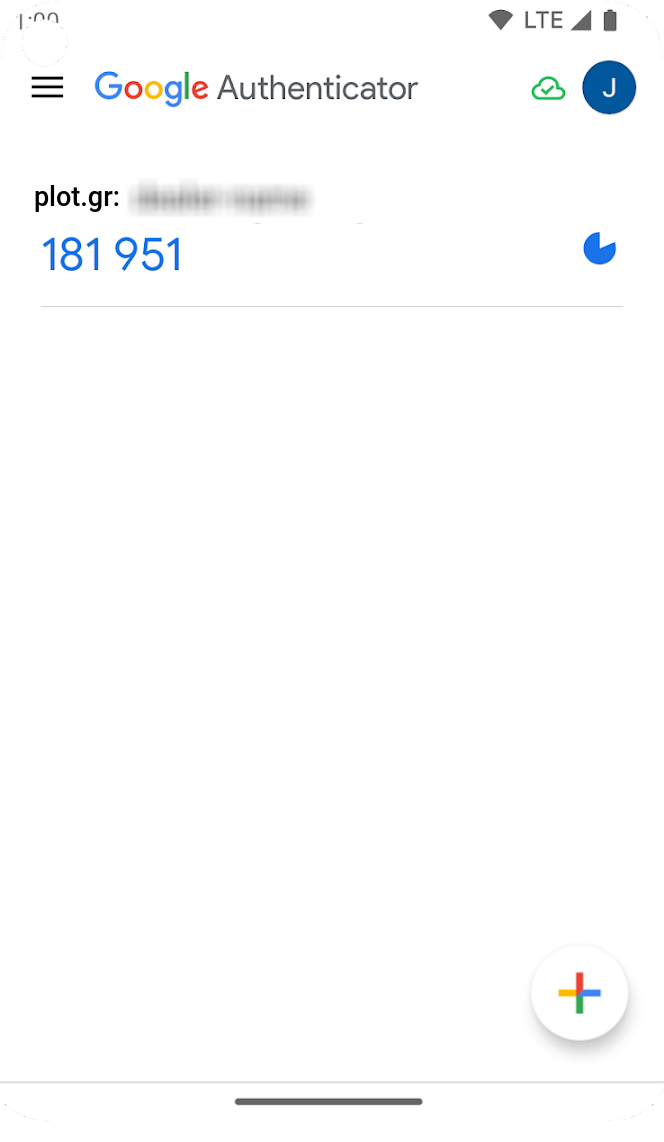
You will notice the setting name and a 6-digit number that changes every 30 seconds.
The next time you will attempt to log in to your account you will be asked to input this number as well as your username and password. Even if one manages to get a hold of your credentials, they will not be able to log in to your account unless they have possession of your physical device.
NOTICE: As soon as you are presented with the QR code, you need to store it on your phone. If you don't, you will be locked out of your account and you will need to follow a recovery procedure. This functionality is completely optional, you don't need to activate it if you think is unnecessary for you.